Why FDA-Regulated Plants Need More Than Paper Procedures

Electronic work instructions manufacturing is no longer a niche idea in pharmaceutical and medical device plants. Operators on a fill line or a sterilization dock still follow procedures, and regulators still expect those procedures to be controlled, current, and traceable. The question is how to get there without drowning people in binders. This article looks at what the FDA expects from digital instructions. It covers where the rules actually bite and how quality teams can roll out a system that stands up during an inspection.
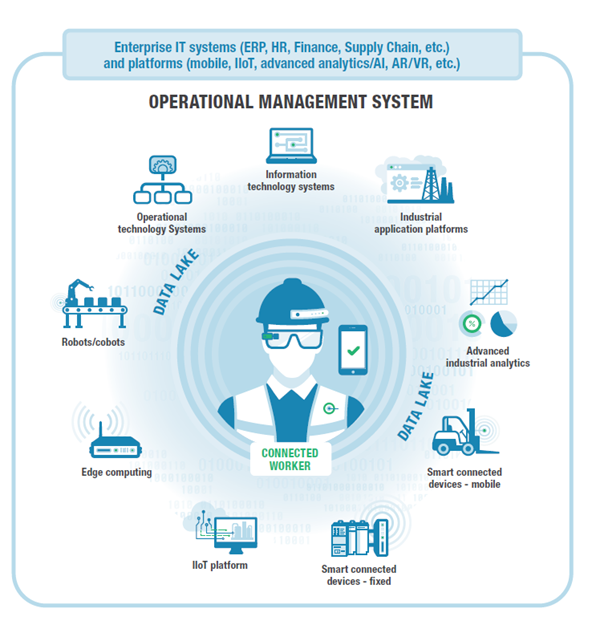
Digital work instructions sit inside the broader topic of connected operations, where frontline procedures, machine data, and quality records live in one place. In a regulated plant, that integration is less about convenience and more about proving who did what, when, and under which approved version. Think of it as moving your Standard Operating Procedures from a printed page that can fade or get replaced. It becomes a controlled record with a built-in history.
Quality and compliance officers usually ask three things first. Does the system meet the expectations in 21 CFR Part 11? Can it capture an audit trail that a reviewer will trust? And how do we roll it out across several sites without creating a validation nightmare? The sections below answer each of those questions in practical terms.
Compliance Requirements for Digital Instructions Under FDA Rules

The core regulation here is 21 CFR Part 11, which sets the criteria for electronic records and electronic signatures. It doesn’t ban electronic systems. It says that when you use them in place of paper records under other FDA predicate rules, they must be trustworthy, reliable, and equivalent to paper. That’s the standard every digital instruction tool needs to meet.
In practice, Part 11 compliance usually breaks into a few groups of controls. There are system controls, like validation, access limits, and protection of records. There are audit trail controls, which record who changed what and when, without overwriting the original entry. And there are signature controls, which tie a named person to a record and make the signature unique and non-transferable. Most failed inspections trace back to a gap in one of these groups, not a dramatic technical failure.
A common misconception is that Part 11 only applies to the software vendor. It doesn’t. The regulation applies to the regulated company that uses the system, which means your quality unit owns the risk. Vendor documentation helps a lot. You still need your own procedures showing how the system is used, who can approve instructions, and how exceptions get handled.
Electronic Work Instructions Manufacturing: Electronic Signature Workflows for Operators and Approvers
Electronic signatures are where most digital instruction projects get tested. Part 11 requires two distinct identification components for a signing event, such as a unique user ID and a password, unless biometrics are used. It also requires the signature to show the printed name of the signer, the date and time. It must include the meaning of the signature, such as “reviewed,” “approved,” or “performed.” If the workflow lets someone tap a button without that context, it won’t hold up. A deeper treatment of this step lives at Vardian enterprise connected worker solutions for fda regulated plants for teams that need it.
A workable approach separates the roles clearly. An operator might perform a step and sign that it was completed. A supervisor might verify a critical checkpoint. A quality reviewer might approve a revised instruction before it goes live on the floor. Each signature should be a distinct event with its own timestamp, not a single batch sign-off that covers twenty steps at once. Lock the sequence so a signature can’t be applied before the prior step is complete. A closely related walkthrough, Linking via Connected Worker Platform Integration with MES Systems, picks up where this section ends.
Shared logins are a red flag. So is a workflow where a team lead signs in on behalf of an operator who is busy with the line. Plants that handle this well usually give each operator a personal credential and train people on what each signature means. It sounds like a small detail, but inspectors often ask people to explain what they signed and why. This pairs well with Setting Up with Connected Worker Software for Automotive Assembly…, which works through concrete examples.
Change Control for Instruction Revisions
Change control is where digital instructions can either help a great deal or create new risk. When a paper procedure changes, someone pulls old copies and hopes the floor catches up. With a controlled digital system, you can push a revision, record the reason, and retire the old version in one controlled action. That’s the upside. The downside is that a poorly governed system lets people edit live instructions too easily.
A sound workflow starts with a change request that describes the reason, the affected steps, and the risk assessment. A qualified reviewer approves the draft, and the system assigns a new version number. The previous version stays in the record with its effective dates, so you can show what operators followed on any given day. Training records should be linked to the new version, and the system should flag anyone who hasn’t completed training before the revision takes effect.
Think about a filling station where a torque value changes after a supplier switch. The change request, the engineering justification, the approval, and the training sign-off should all sit in the same chain. When an investigator asks why a batch was filled at a different setting in March, you can answer with records rather than memory.
Validation Documentation You Will Be Asked For
Validation is the evidence that the system does what you say it does. Most teams break it into installation qualification, operational qualification, and performance qualification, often shortened to IQ, OQ, and PQ. The FDA’s General Principles of Software Validation guidance is a useful reference for how regulators think about risk-based testing of software used in regulated processes.
Your validation package should include a risk assessment, a requirements document, test scripts with expected and actual results, and a traceability matrix. It links each requirement to a test. It should also cover audit trail testing, such as confirming that edits are logged, that original entries remain visible, and that users can’t delete records. Keep the package under version control, because a reviewer will want to know which release was validated.
Validation doesn’t end at go-live. Periodic review, change-triggered revalidation, and a documented process for vendor updates all belong in your quality system. Many plants underestimate how much work an upgrade creates. A minor vendor patch may still need impact assessment, and it’s better to decide that on paper than to discover it during an audit.
Common Mistakes in Audit Trail Design
Audit trails look simple on a vendor demo screen, but several design errors show up again and again. Most of them are easy to avoid if you catch them during requirements review.
- ❌ Wrong: the audit trail only logs that a record changed. ✅ Right: it records the old value, the new value, the user, the reason, and the timestamp for every change.
- ❌ Wrong: administrators can turn off logging or edit the log. ✅ Right: audit logs are write-protected, and any configuration change is itself logged and reviewed.
- ❌ Wrong: timestamps come from local device clocks that drift. ✅ Right: a synchronized, controlled time source is used, and the system is tested for accuracy.
- ❌ Wrong: reviewers never look at the audit trail until an inspection. ✅ Right: quality reviews a defined sample of audit entries on a set schedule and documents the review.
- ❌ Wrong: the team validates the software but not the workflow. ✅ Right: the validated process matches how operators actually use the system on the floor.
Rolling Out Digital Work Instructions Across Multiple FDA Sites
Once one site works, the temptation is to copy the setup to every other plant. That usually goes wrong. Each site has its own equipment, its own staff, and its own legacy paper records. A phased rollout with a common quality framework and local process owners tends to hold up far better than a single big-bang launch. It also gives you a chance to refine the change control and signature workflows before they reach every line.
Start with a pilot line that has stable processes and motivated supervisors. Run the system in parallel with paper where your procedures require it for electronic work instructions manufacturing. Capture lessons on training time, signature friction, and any gaps in the audit trail. Be honest about trade-offs. Digital systems add login steps and screen time, and frontline staff may push back if the interface is slow or poorly placed on a shared terminal.
Keeping Your Digital Instruction Program Inspection-Ready
Compliance in electronic work instructions manufacturing comes down to a few habits that plants can sustain. Keep your Part 11 controls documented and tested. Make every signature meaningful and tied to a named person. Govern revisions through change control, and keep old versions retrievable for the periods your predicate rules require. Review audit trails on a schedule instead of waiting for an inspector to ask.
If your team is planning a rollout or preparing for an upcoming inspection, a validation gap assessment is a practical first step. Vardian can help quality and operations teams map their current instruction processes against these requirements and plan a controlled path to digital execution. Reach out to start a conversation about validation support for your sites.
- Linking digital work instructions to existing MES systems
- Automotive Plant Alert Escalation Using Connected Worker Tools
- Mobile Notifications Reach Supervisors Through Connected Worker Escalation
- Machine Downtime Alert Rules for Connected Worker Platforms
- Oil and Gas Teams Build Real-Time Escalation for Connected Worker Alerts
Related Posts

Connected worker platform integration security scorecard for shift-based manufacturing deployments
Assessing Integration Risks in Manufacturing Environments Assessing Integration Risks in…

What product categories support time-stamped SOP tied to shifts?
How time stamped SOP steps tied to shift and product…
Vendor-by-Vendor Check for Connected Worker Manufacturing
What Is Connected Worker Manufacturing? What Is Connected Worker Manufacturing?…