Closing the proof-to-production gap
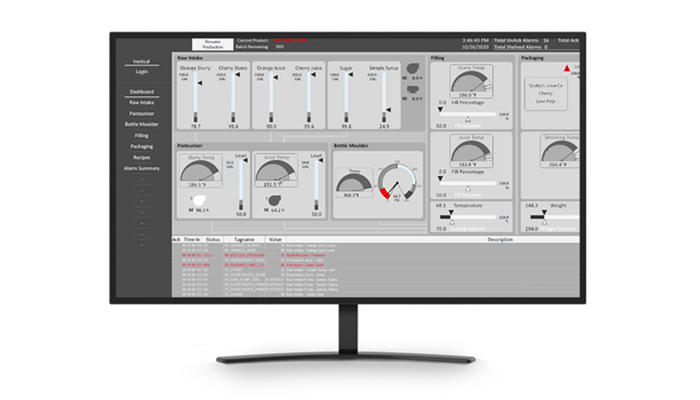
Many industrial sites run proof-of-concept trials that never reach steady daily use. The gap usually appears because work instructions alone cannot carry the full load. Identity management, device choice, data connections, and shift training must be designed as one system from the start. When these pieces stay separate, frontline teams revert to paper or spreadsheets within weeks. Connected worker software closes that gap by turning isolated tasks into complete digital workflows that survive real production pressure. Plant managers and solution architects therefore look for a repeatable path that moves from site requirements to live operations without losing momentum. This article lays out the sequence that has worked across multiple manufacturing environments. In practice, pilots of digital checklists have reduced shift handover errors once the full workflow included real-time escalation to maintenance supervisors.
Connected worker software succeeds only when every department that touches the workflow stays involved from day one. Production, maintenance, quality, and safety teams each bring different data needs and failure points. Mapping those needs early prevents later rework. The same principle applies to network coverage and device durability on the floor. Sites that ignore these details watch adoption stall after the pilot ends. Sites have learned this lesson the hard way when operators abandoned tablets after discovering Wi-Fi dead zones near mixing tanks; only after adding mesh nodes did daily usage climb.
Another common barrier is the assumption that software alone will drive change. Without clear ownership and visible metrics, even well-designed connected worker solutions fade into background noise. Successful sites treat the rollout as an operational program rather than a one-time IT project, assigning cross-functional sponsors who meet weekly during the first 90 days.
How to Do It
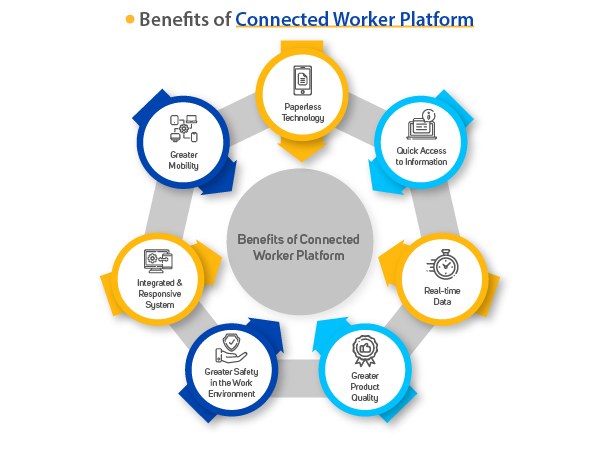
The following eight steps turn a connected worker software pilot into reliable plant operations. Each step builds on the last so nothing gets skipped when pressure rises. Following the sequence in order has helped teams avoid the classic trap of launching features that look good in a demo but fail under real shift conditions.
-
Select two or three connected worker use cases that already have clear owners and measurable failure modes. Start with tasks such as shift handover checklists or safety observation reports because these repeat every day and produce immediate data. Assign one operations lead and one IT lead to each use case so decisions do not stall. Document the current failure rate in hours or incidents so later results can be compared. Avoid broad ambitions such as “digitize everything” because they dilute focus and budget. Keep the scope narrow enough that a single shift can test the full loop within two weeks. In practice, many sites begin with a simple “near-miss” reporting form that feeds directly into the safety database; operators see their input acted upon within 24 hours and quickly adopt the habit.
-
Define every workflow state from initial request through completion and escalation. List the exact data fields required at each step and who can change the state. Build escalation rules that trigger after a set time or when a threshold is crossed. Test the rules with real operators so the logic matches actual shop floor behavior. Include a clear “reopen” path because issues often reappear after first closure. This structure keeps connected worker software from becoming a black hole where requests disappear. Sites have added auto-escalation timers for temperature deviations; the rule catches potential spoilage events that would have otherwise gone unnoticed until the next quality audit.
-
Choose connected worker devices and set realistic offline expectations for the shop floor. Rugged tablets or intrinsically safe phones work better than consumer models when exposure to dust, vibration, and wash-downs is constant. Decide how many hours of offline operation each device must support and test that limit during the pilot. Map Wi-Fi dead zones and add access points or use cellular failover before content goes live. Document battery swap procedures so operators never lose work mid-task. Device choice directly affects whether connected worker manufacturing stays reliable across all shifts. Sites that selected consumer-grade tablets discovered the batteries lasted only a short time in extreme areas; switching to heated rugged units with hot-swap batteries solved the problem before full rollout. For facility teams, the Vardian facility management case documents what this looks like after rollout. This pairs well with Audit inspection with connected worker solution: evidence flow…, which works through concrete examples.
-
Design content and forms that tie directly to real assets and work orders rather than generic templates. Pull asset IDs, location codes, and last maintenance dates from the existing system so operators do not re-enter data. Keep forms short by using conditional fields that appear only when needed. Include photo capture with automatic timestamping for audit trails. Review every screen with the actual users who will complete it during their shift. This step prevents the common complaint that digital instructions take longer than paper ones. When teams pre-populated asset details such as serial numbers and last inspection dates, form completion time dropped significantly.
-
Configure integration inputs so asset context, maintenance history, and quality records flow into the worker platform automatically. Map each data source to the exact fields used in the workflow. Set refresh intervals that match how often the source system updates. Run a data quality check for thirty days before go-live to catch missing or stale records. When integrations work cleanly, operators trust the information in front of them and stop keeping separate spreadsheets. Poor integration is the fastest way connected worker solutions lose credibility on the floor. Sites that connect the worker platform to their CMMS see maintenance teams respond faster because work orders arrive with photos and exact location data already attached.
-
Set security, auditing, and role permissions before any user logs in. Define who can create, edit, or approve each workflow type and log every change with user ID and timestamp. Use single sign-on where the site already has it so operators do not manage another password. Test permission changes across shifts to confirm the rules hold when supervisors are absent. Auditing also supports compliance audits later because every action carries an automatic record. Security configuration done early avoids emergency changes once live traffic begins. Sites have discovered during testing that certain shifts lacked approval rights for certain safety overrides; correcting the roles before launch prevented extended workarounds.
-
Run a shift-based pilot with explicit success criteria and continuous data capture. Measure time to complete tasks, error rates, and operator feedback each day. Hold a short review at the end of every shift so issues are fixed before the next crew starts. Capture both quantitative numbers and qualitative comments so the final report reflects real conditions. Limit the pilot to two or three weeks so momentum stays high and changes remain manageable. A well-run pilot reveals whether the connected worker platform fits the site before wider rollout begins. Teams that publish daily dashboards during the pilot often see friendly competition emerge between shifts, accelerating adoption.
-
Perform operational acceptance and change management so the system moves into steady-state use without backsliding. Write acceptance criteria for each use case that include uptime, support response times, and training completion rates. Schedule refresher sessions for new hires and for any workflow changes. Assign a permanent owner who monitors dashboards and adjusts forms as processes evolve. Document the handoff from project team to operations so knowledge does not leave with consultants. Only after acceptance is signed does the site move additional lines or plants onto the same worker platform. Several facilities now require the operations owner to sign a simple one-page SLA covering response times before the project team disbands.
Design review routing for exceptions
Design exception paths before launch
Every workflow eventually hits missing data or an unexpected condition. Build a simple “flag for review” button that routes the item to a supervisor without stopping the operator. Test these paths during the pilot so they feel natural rather than bolted on later. Sites have added a “material shortage” flag using connected worker software that automatically notified procurement; the feature reduced unplanned downtime.
Keep training tied to the exact workflow
Short, task-specific sessions work better than long classroom courses. Record a two-minute video of the actual screen flow and let operators watch it on the device itself. Refresh the video whenever a form changes so the training stays current. Many plants now embed the micro-video directly inside the first screen of each new form so operators can replay it on demand.
Verify network and device performance first
Content authoring should wait until coverage and battery life are proven across all areas and shifts. Walking the floor with a signal meter and a spare battery pack reveals problems that desktop tests miss. Fix these issues early so later training focuses on work, not connectivity. A practical habit is to create a simple coverage heat map during the site walk and share it with the IT team before any content is built.
Document acceptance criteria in writing
Verbal agreements fade once daily pressure returns. Write measurable targets for task completion time, error reduction, and support ticket volume. Both the project team and operations sign the list before the pilot ends. Sites have added a requirement that most operators complete their first digital checklist without calling the help desk; the metric proved far more predictive of long-term success than any feature checklist.
Plan for seasonal and shift-pattern changes
Workforce size and experience levels fluctuate with seasons and overtime schedules. Using connected worker software, teams build a lightweight onboarding checklist inside the same platform so new or temporary workers can complete required safety observations on day one without extra classroom time.
Document acceptance criteria per use case
Treat every connected worker software rollout as workflow engineering rather than software installation. Document acceptance criteria for each use case before any expansion begins. When the first three steps succeed, the same pattern applies to additional lines or sites with far less risk. Sites that follow this sequence report faster adoption and fewer support tickets after go-live. See vardian.io for examples of how other facilities structured their integrations and device choices. Start with the narrowest scope that still delivers measurable value, then scale once the foundation holds. The most successful programs revisit their original use-case list every six months and retire any workflow that no longer matches current production priorities, keeping the platform lean and relevant.
Further Reading
- Six manufacturing connected worker use cases and what software must do for each
- Connected worker platform options compared: Corvex, Aveva, Honeywell, SAP, and Parsable for manufacturing teams
{“name”:”From site requirements to live operations: implementation steps for connected worker software”,”step”:[{“name”:”Select two or three connected worker use cases that already have clear owners an”,”text”:”Select two or three connected worker use cases that already have clear owners and measurable failure modes. Start with tasks such as shift handover checklists or safety observation reports because these repeat every day and produce immediate data. Assign one operations lead and one IT lead to each use case so decisions do not stall. Document the current failure rate in hours or incidents so later results can be compared. Avoid broad ambitions such as “digitize everything” because they dilute focus and budget. Keep the scope narrow enough that a single shift can test the full loop within two weeks. In practice, many sites begin with a simple “near-miss” reporting form that feeds directly into the safety database; operators see their input acted upon within 24 hours and quickly adopt the habit.”,”@type”:”HowToStep”,”position”:1},{“name”:”Define every workflow state from initial request through completion and escalati”,”text”:”Define every workflow state from initial request through completion and escalation. List the exact data fields required at each step and who can change the state. Build escalation rules that trigger after a set time or when a threshold is crossed. Test the rules with real operators so the logic matches actual shop floor behavior. Include a clear “reopen” path because issues often reappear after first closure. This structure keeps connected worker software from becoming a black hole where requests disappear. Sites have added auto-escalation timers for temperature deviations; the rule catches potential spoilage events that would have otherwise gone unnoticed until the next quality audit.”,”@type”:”HowToStep”,”position”:2},{“name”:”Choose connected worker devices and set realistic offline expectations for the s”,”text”:”Choose connected worker devices and set realistic offline expectations for the shop floor. Rugged tablets or intrinsically safe phones work better than consumer models when exposure to dust, vibration, and wash-downs is constant. Decide how many hours of offline operation each device must support and test that limit during the pilot. Map Wi-Fi dead zones and add access points or use cellular failover before content goes live. Document battery swap procedures so operators never lose work mid-task. Device choice directly affects whether connected worker manufacturing stays reliable across all shifts. Sites that selected consumer-grade tablets discovered the batteries lasted only a short time in extreme areas; switching to heated rugged units with hot-swap batteries solved the problem before full rollout. For more context, see vardian.io.”,”@type”:”HowToStep”,”position”:3},{“name”:”Design content and forms that tie directly to real assets and work orders rather”,”text”:”Design content and forms that tie directly to real assets and work orders rather than generic templates. Pull asset IDs, location codes, and last maintenance dates from the existing system so operators do not re-enter data. Keep forms short by using conditional fields that appear only when needed. Include photo capture with automatic timestamping for audit trails. Review every screen with the actual users who will complete it during their shift. This step prevents the common complaint that digital instructions take longer than paper ones. When teams pre-populated asset details such as serial numbers and last inspection dates, form completion time dropped significantly.”,”@type”:”HowToStep”,”position”:4},{“name”:”Configure integration inputs so asset context, maintenance history, and quality “,”text”:”Configure integration inputs so asset context, maintenance history, and quality records flow into the worker platform automatically. Map each data source to the exact fields used in the workflow. Set refresh intervals that match how often the source system updates. Run a data quality check for thirty days before go-live to catch missing or stale records. When integrations work cleanly, operators trust the information in front of them and stop keeping separate spreadsheets. Poor integration is the fastest way connected worker solutions lose credibility on the floor. Sites that connect the worker platform to their CMMS see maintenance teams respond faster because work orders arrive with photos and exact location data already attached.”,”@type”:”HowToStep”,”position”:5},{“name”:”Set security, auditing, and role permissions before any user logs in. Define who”,”text”:”Set security, auditing, and role permissions before any user logs in. Define who can create, edit, or approve each workflow type and log every change with user ID and timestamp. Use single sign-on where the site already has it so operators do not manage another password. Test permission changes across shifts to confirm the rules hold when supervisors are absent. Auditing also supports compliance audits later because every action carries an automatic record. Security configuration done early avoids emergency changes once live traffic begins. Sites have discovered during testing that certain shifts lacked approval rights for certain safety overrides; correcting the roles before launch prevented extended workarounds.”,”@type”:”HowToStep”,”position”:6},{“name”:”Run a shift-based pilot with explicit success criteria and continuous data captu”,”text”:”Run a shift-based pilot with explicit success criteria and continuous data capture. Measure time to complete tasks, error rates, and operator feedback each day. Hold a short review at the end of every shift so issues are fixed before the next crew starts. Capture both quantitative numbers and qualitative comments so the final report reflects real conditions. Limit the pilot to two or three weeks so momentum stays high and changes remain manageable. A well-run pilot reveals whether the connected worker platform fits the site before wider rollout begins. Teams that publish daily dashboards during the pilot often see friendly competition emerge between shifts, accelerating adoption.”,”@type”:”HowToStep”,”position”:7},{“name”:”Perform operational acceptance and change management so the system moves into st”,”text”:”Perform operational acceptance and change management so the system moves into steady-state use without backsliding. Write acceptance criteria for each use case that include uptime, support response times, and training completion rates. Schedule refresher sessions for new hires and for any workflow changes. Assign a permanent owner who monitors dashboards and adjusts forms as processes evolve. Document the handoff from project team to operations so knowledge does not leave with consultants. Only after acceptance is signed does the site move additional lines or plants onto the same worker platform. Several facilities now require the operations owner to sign a simple one-page SLA covering response times before the project team disbands.”,”@type”:”HowToStep”,”position”:8}],”@type”:”HowTo”,”@context”:”https://schema.org”}
Related Posts
Connected Worker Manufacturing: Workflow from Tasks to Escalation
Workflow design for connected worker success Workflow design decides whether…
Common Questions About a Connected Worker Platform
Generate the most common questions users ask about connected worker…

Evaluate connected worker integrations: a security-first scorecard for existing manufacturing IT stacks
Why Security-First Scorecards Matter for Manufacturing IT Teams Why Security-First…