Buyers usually pick a platform category before they pick a vendor, and shift coverage is the main thing that sorts one category from another. A tablet that works fine on the day shift can fall apart at 2 a.m. when the Wi-Fi drops on the back half of the line. That gap is why the category question matters first. This article ranks the main connected worker platform types you will see when you search for digital work instructions for manufacturing, and explains how each one handles shifts, offline work, and validation. The goal is to help you shortlist categories before you sit through a stack of demos.
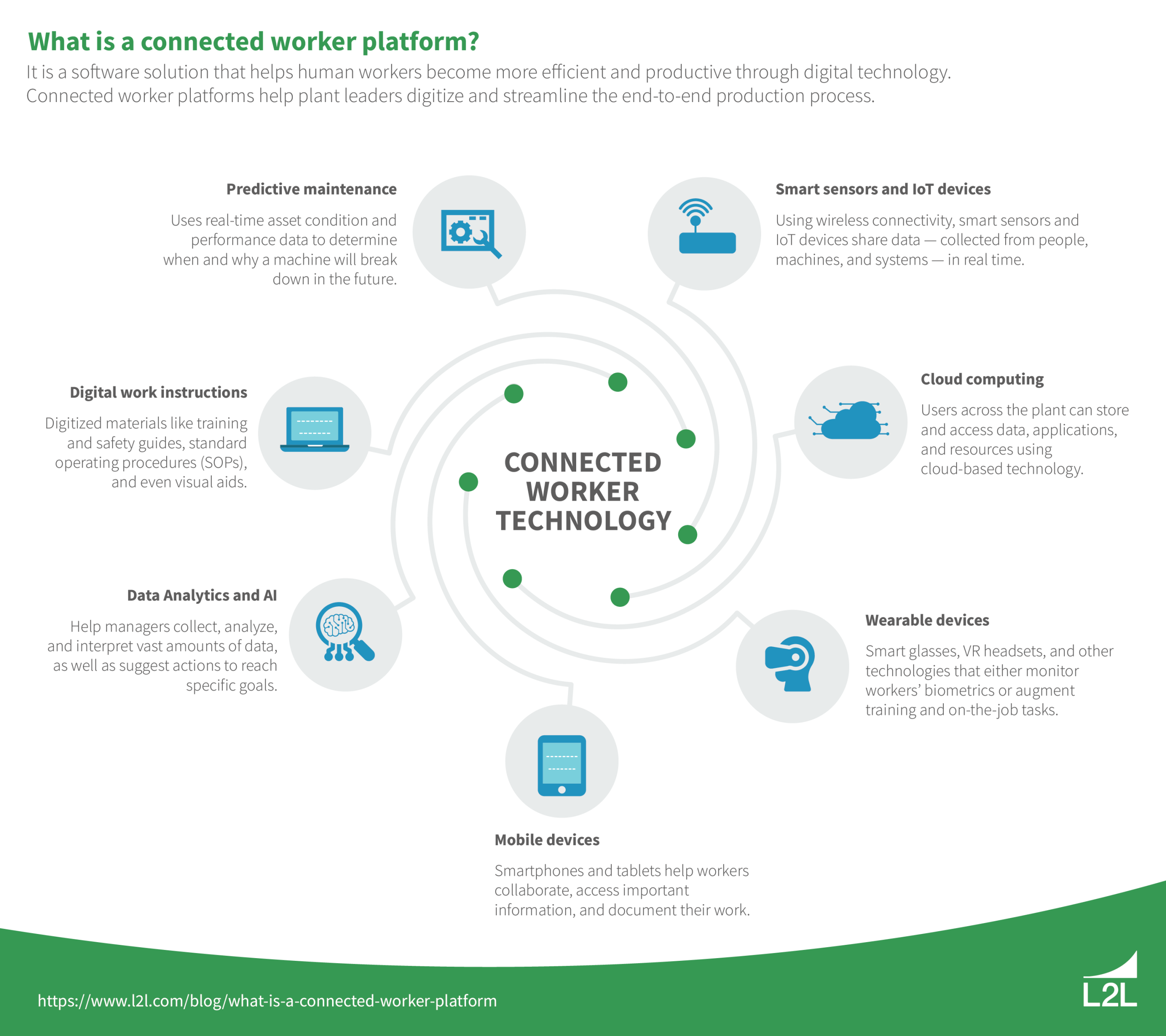
Connected worker platforms sit in the wider field of industrial internet of things software, where the job is to link people, machines, and procedures on the plant floor. Most of the platforms you will evaluate do some version of the same thing: show an operator the right step, capture the result, and push that record somewhere useful. The differences show up in where the instruction lives and how it behaves when the network does not cooperate.
Five Connected Worker Platform Categories and How They Fit Shift Work
The five categories below cover most of what you will find on a shortlist. None of them is universally better. Each one fits a particular floor layout, shift pattern, and tolerance for risk. Read them as descriptions of fit, not as rankings of vendors.
Digital Work Instructions for Manufacturing: Tablet-Based Operator Apps
Tablet-based apps are the most common starting point. A ruggedized tablet mounts at a station or rides on a cart, and the operator follows step-by-step instructions with photos, short videos, and tick-off steps. They suit lines where work is mostly manual and the operator needs to read and confirm each step. Shift fit is usually good because a tablet can be handed from one operator to the next with a simple login. Offline behavior varies a lot. Many apps cache the current work order, but capturing sign-offs during an outage often depends on how the vendor syncs data afterward. Validation tends to rely on electronic signatures and required-field logic, so a step cannot be skipped without a reason code. Ask how the app handles a tablet that goes dark mid-task. A closely related walkthrough, How to Roll Out Connected Worker Digital SOP Compliance Features, picks up where this section ends.
Wearable and Hands-Free Display Systems
Wearable systems put instructions on a head-mounted display or a wrist device, which leaves both hands free for assembly, wiring, or material handling. They make sense in tight cells where a tablet would be in the way or where gloves and contamination control make touchscreens impractical. Shift handovers can be awkward, though, because each device has to be fitted, paired, and charged, and that takes time at the start of a shift. Offline support is often limited to instructions stored on the device itself. Validation usually happens through voice confirmation or a barcode scan at each step. Plan for a pilot on a single cell before you commit to fleet-wide hardware.
MES-Embedded Instruction Modules
Some plants already run a manufacturing execution system, and many of those systems include an instruction module. The appeal is obvious: work orders, routings, and quality records live in one place, so there is no second database to reconcile. Shift fit depends on how the MES handles role-based access and shift calendars. Offline behavior is the weak point in many setups, since MES clients often need a live server connection to record a completed step. Validation tends to be strong because the instruction is tied directly to the routing and to approved revision numbers. The trade-off is flexibility. Changing an instruction can mean involving the MES administrator, which slows down small fixes.
Cloud-Native Standalone Platforms
Cloud-native platforms are built to be separate from the MES and ERP. They manage authoring, distribution, and records on their own, and they connect to other systems through APIs. They often suit companies running several sites, because one authoring workflow can push instructions to many plants. Shift fit is generally good, with per-shift dashboards and assignment rules that follow the crew rather than the machine. Offline behavior is the question to press hardest. A cloud-first design may need a local cache or a sync queue before it can serve a plant with unreliable links. Validation is often handled through approval workflows and audit trails that record who changed what and when.
Hybrid Edge Deployments for Weak Connectivity
Plants with patchy networks, thick concrete, or metal-heavy buildings often need an edge layer. In a hybrid setup, a local server runs the instruction library and collects records, then syncs to the cloud when the link returns. This category fits older facilities and remote sites where a full outage is a regular event rather than a rare one. Shift fit is strong because operators keep working through network drops. Offline behavior is the main reason to choose this category, though it adds a server to maintain. Validation should be checked carefully, since records captured offline must keep their original timestamps and must not be overwritten during sync. Ask the vendor to demonstrate a full outage test before you sign.
Key Points
- Pick a category before you compare vendors, because the category decides how instructions behave on each shift.
- Test offline behavior with a deliberate network cut, not with a vendor’s description of it.
- Check whether validation uses electronic signatures, revision control, and immutable audit trails.
- Match hardware to the task: hands-free displays suit tight cells, tablets suit stations with light manual work.
- Plan a single-cell pilot on each shortlisted category before committing to plant-wide rollout.
Narrowing the categories first saves a lot of time. Once you have two or three that fit your floor, compare the shortlisted platforms on integration with your MES or maintenance system and on how they validate each recorded step. That comparison is where the real differences tend to appear. If you want a practical next step, list your three most common shift patterns and your worst network dead zone, then see which categories still hold up. A platform that handles both is worth a serious look.
About this guide: this article is written from a general industrial operations perspective and does not reflect testing of any specific vendor’s product.
Related Topics
- Automotive Plant Alert Escalation in Practice: A Case Study of Reduced Line Stoppages
- What Enterprise Alert Escalation Platforms Cost and How Pricing Models Differ
- Heavy Industry Escalation Systems: A Five-Phase Implementation Roadmap
- Mobile Escalation Notifications for Supervisors: What to Send, When, and to Whom
- Connected Worker Escalation Rules for Machine Downtime: How Alerts Should Climb the Chain
Related Posts

From detection to escalation via connected worker strategy
Why Alerts Reach Operators But Action Stops There Why Alerts…
Which connected worker platform fits your manufacturing stack: integration, security, and rollout
What Is Connected Worker Platform? What Is Connected Worker Platform?…

Connected Worker Instructions Validation for Night Shifts: What to Cover
Connected Worker Instructions for Night Shifts: What Validation Should CoverPhoto:…